



-
Beacon Receivers
EVO-RBR (Rev B)
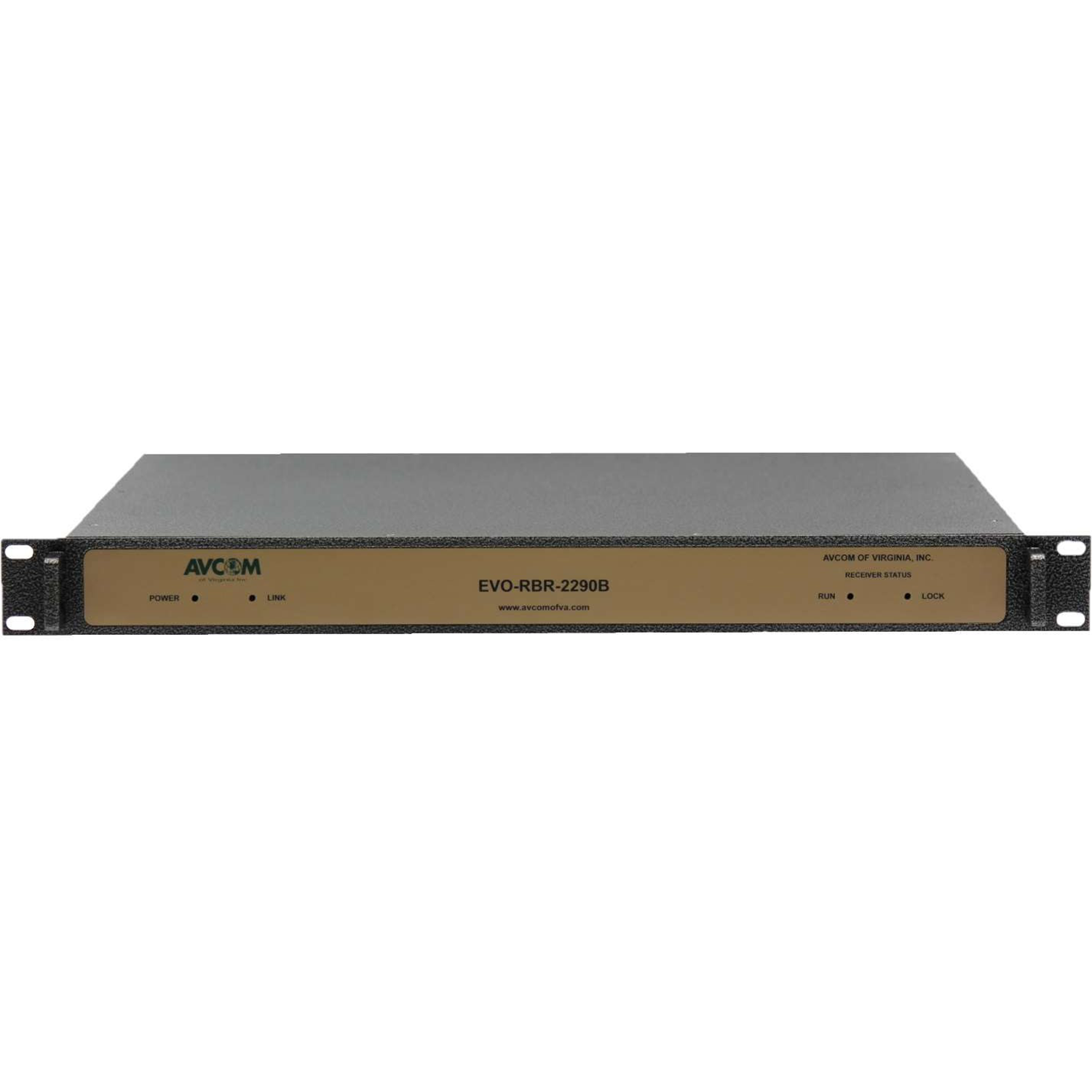
The EVO-RBR is a satellite beacon receiver designed on a completely new platform to meet today’s
system challenges. This robust product features many capabilities to provide reliable operation and
monitoring in rackmount applications.
A CW satellite beacon carrier can be acquired quickly and tracked in On-the-Move, as well as in
fixed-site applications. The receiver can lock on and track BPSK-type carrier signals and is uniquely
capable of locking on and tracking DVB-like carriers utilizing an exclusive Avcom-only Carrier- EdgePower-Tracking (CEPT) function. In addition, it provides a voltage output from 0 to 10 VDC
proportional with the input signal.
A unique feature of this beacon receiver is that when the beacon receiver function is not in use it
can be used as a full-function spectrum analyzer. This allows systems to track on a beacon and
monitor a carrier without the need for a separate device.
The beacon receiver can be connected via ethernet, USB, or serial, and supports communication
with a WEB-GUI, POSIX-C API, text-based API, and Avcom’ s EVO GUI. This wide range of options
makes the unit ideal for interfacing with large complex M&C systems or simple microprocessorbased systems.
For more information and support, please contact salesrfq@avcomofva.com.SKU: EVO-RBR (Rev B)
EVO-RBR (Rev B)
The EVO-RBR is a satellite beacon receiver designed on a completely new platform to meet today’s
system challenges. This robust product features many capabilities to provide reliable operation and
monitoring in rackmount applications.
A CW satellite beacon carrier can be acquired quickly and tracked in On-the-Move, as well as in
fixed-site applications. The receiver can lock on and track BPSK-type carrier signals and is uniquely
capable of locking on and tracking DVB-like carriers utilizing an exclusive Avcom-only Carrier- EdgePower-Tracking (CEPT) function. In addition, it provides a voltage output from 0 to 10 VDC
proportional with the input signal.
A unique feature of this beacon receiver is that when the beacon receiver function is not in use it
can be used as a full-function spectrum analyzer. This allows systems to track on a beacon and
monitor a carrier without the need for a separate device.
The beacon receiver can be connected via ethernet, USB, or serial, and supports communication
with a WEB-GUI, POSIX-C API, text-based API, and Avcom’ s EVO GUI. This wide range of options
makes the unit ideal for interfacing with large complex M&C systems or simple microprocessorbased systems.
For more information and support, please contact salesrfq@avcomofva.com.

Rack Mount Beacon Receiver
- Track CW Beacon Carrier and BPSK Carrier
- CEPT Carrier-Edge-Power-Track for DVB-like Carrier
- Monitoring C Control (M&C) via Multiple Interfaces
- L-Band and Extended Frequency Band Options
|
RF SPECIFICATIONS |
||||
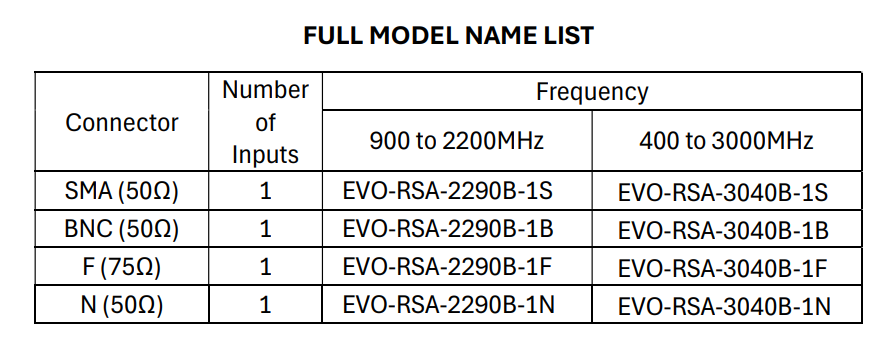
| INPUT CONNECTORS: | SMA, BNC, F, and/or N | |||
| NOMINAL INPUT IMPEDANCE: | 50 Ω (SMA, BNC, N)
75 Ω (F) |
|||
| MAX DC INPUT VOLTAGE: | 25 V | |||
|
INPUT FREǪUENCY RANGE: |
MODEL | MIN (MHz) | MAX (MHz) | |
| 2290 | 900 | 2200 | ||
| 3040 | 400 | 3000 | ||
| 6070 | 70 | 6000 | ||
| MAX SPAN WIDTH: | 1300 MHz | |||
| MIN TUNING STEP SIZE: | 1 kHz | |||
| RESOLUTION BANDWIDTH: | 1 kHz, 3 kHz, 10 kHz, 30 kHz, 100 kHz, 300 kHz, 1 MHz | |||
| REFERENCE LEVELS: | -40 dBm, -30 dBm, -20 dBm, -10 dBm | |||
| MAXIMUM INPUT POWER LEVEL: | -10 dBm | |||
| RF SENSITIVITY (-40 REF LVL): | -100 dBm | |||
| SPUR FREE DYNAMIC RANGE (3kHz RBW): | 60 dB | |||
| NOISE FLOOR (-40 REF LVL, 3kHz RBW): | -100 dBm, -134 dB/Hz | |||
| NOISE FLOOR (-10 REF LVL, 3kHz RBW): | -70 dBm, -104 dB/Hz | |||
| ISOLATION BETWEEN INPUTS: | >40 dB typical | |||
| AMPLITUDE ACCURACY: | +/- 1 dB typical | |||
| FREǪUENCY ACCURACY: | +/- 1 kHz typical | |||
|
PHASE NOISE (2 GHz): |
OFFSET FREǪUENCY | PHASE NOISE (dBc/Hz) | ||
| 10 kHz | -100 | |||
| 100 kHz | -100 | |||
| 1 MHz | -109 | |||
|
BEACON RECEIVER SPECIFICATIONS |
|
| DETECTION BANDWIDTH: | 10 to 750 kHz |
| TRACKING BANDWIDTH: | 10 to 150 kHz |
| DETECTED LEVEL FILTERING: | Low-Pass, User-Select: 0.25 Hz, 0.5 Hz,
1.0 Hz, 2.0 Hz, 3.0 Hz |
| SEARCH/TRACK RATE: | User-Selectable: 10 Hz, 25Hz, 100Hz |
| ACǪUISITION TIME: | <1 second typical |
| ADJUSTABLE DELAY BEFORE LOCK: | 0 to 5000 milliseconds |
| ACǪUISITION/TRACKING LEVEL: | Minimum C/No, 39 dB-Hz |
| BEACON/CARRIER TYPE: | CW, BPSK (No Demod), CEPT(Carrier-
Edge-Power-Track) on DVB (No Demod) |
| SPECIAL FEATURE: | Spectrum Analyzer features are available
when Beacon Receiver is not running |
|
COMMUNICATION INTERFACE |
|
| ETHERNET: | 10/100, DHCP or Static, RJ45 |
| SERIAL: | RS232, 115200 8n1, DB-9 |
| USB: | 115200 8n1, USB-B |
| BEACON RECEIVER OUTPUTS: | Analog and Digital outputs, 6-Pos Terminal Block |
|
M & C |
||||
| EVO GUI | POSIX-C API SBS2API | TEXT-BASED API | WEB-GUI | |
| ETHERNET: | Yes | Yes | N/A | Yes |
| SERIAL: | N/A | Yes | Yes | N/A |
| USB: | Yes | Yes | Yes | N/A |
|
RECEIVER OUTPUTS |
|
| CONNECTOR: | 6-Pos Terminal Block |
| ANALOG SIGNAL STRENGTH INDICATOR OUTPUT: | 0 to 10 VDC, 10 mA |
| ANALOG SLOPE: | 0.1 to 3.0 Volts/dB |
| ANALOG SLOPE POLARITY: | Positive or Negative |
| ANALOG OUTPUT FILTERING: | Low-Pass, 0.5 Hz, fixed. |
| DIGITAL LOCK INDICATOR OUTPUT: | 0 – 3.3 VDC |
| DIGITAL LOCK INDICATOR OUTPUT POLARITY: | Adjustable (H=LOCK or L=LOCK) |
|
POWER |
|
| CONNECTOR: | Barrel Connector Jack |
| POWER SUPPLY: | 15 VDC, 0.5A |
|
PHYSICAL |
|
|
DIMENSIONS: |
1 RU,
19 in. x 18.13 in. x 1.72 in. 48.26 cm x 46.04 cm x 4.37 cm |
| WEIGHT: | 7.2 lbs, 3.27 kg |
|
ENVIRONMENTAL |
|
| OPERATING TEMPERATURE: | 0°C to 50°C |
| STORAGE TEMPERATURE: | -40°C to 85°C |
| HUMIDITY: | 0 to 95%, non-condensing |
| MAX OPERATING ALTITUDE: | 40,000 ft; 12,000 m |

PIN POSITIONS AND DESCRIPTIONS
FRONT OF CHASSIS

BACK OF CHASSIS
SMA CONNECTOR OPTIONS:
NOTE: BNC, F AND N CONNECTORS ARE NOT SHOWN BUT FOLLOW A SIMILAR LAYOUT

EVO-GUI Software
- EVO – GUI Software
- EVO – GUI User Manual
Release Notes
-
v1.5.2.0 (released 6/10/2025)
- Includes all fixes from v1.4.2.0
- Fix possible mismatched SA handles by making initialization thread-safe
- Add recovery for old EVO-RSA-6070A units causing crashing
- Fix bug on shape alarms not always loading correctly
- Update how presets are handled internally
- Fix bug with inverted LO offset in presets
- Fix bug with invalid SA options on change of connection
- Update sbs2api to v2.19.3.0
- Update Qt to v5.15.2
-
v1.4.2.0
- Includes all fixes from v1.2.4.0
- Add 100Hz BR update rate
- Add external inverted downconverter support
- Add inverted C-Band downconverter to default LO offset list
- Add slot 31 to default SA list
- Fix LO offset not loading correctly bug for BR config frequency
-
v1.2.4.0
- Includes all fixes from v1.2.3.0
- Update sbs2api to v2.13.3.0 (add BR-MOD-1-9-B USB support)
-
v1.2.3.0
- Includes all fixes from v1.1.6.0
- Fix spectrum mode support on old SBS2 units that did not properly support AVCOM_SBS_QueryFeature
- Fix RBW selection in BR preview mode to make sure RBW is valid
- Update measured frequency to fix corrected sbs2api unit error
- Improve graph utilization by getting unit-specified dynamic range using AVCOM_SA_GetDynamicRange
- Fix reconnect bug when using quick connect
- Fix bug when input was unable to be set
- Fix bug on set input for SBS1 products with different reflvls
- Update sbs1api to v1.8.3.0
- Update sbs2api to v2.10.3.0
- Update aovhpbasic to v1.3.3.0
-
v1.1.6.0
- Includes all fixes from v1.0.3.0
- Add HW and BOM version to analyzer info screen
- Add Linux build options
- Update default demo slot names
- Change default trace color to yellow
- Remove unused help buttons
- Fix dB and dBm typos
- Increase max graph range to 30dBm
- Add an optional advanced feature menu and full support for sweep optimization within the new menu
- Update sbs2api to v2.8.4
- Use AVCOM_BR_GetLatestData over AVCOM_BR_GetLastSweep if BR supports it
- Add support for changing network settings over USB
- Add search on all network adapters options to fix most common network search problems
-
v1.0.3.0
- Initial v1.0 Release
EVO-GUI (Graphical User Interface)
After installing and running the GUI software, click on the

Related products
-
Spectrum Analyzers
EVO-RSA (Rev B)
The EVO-RSA is a spectrum analyzer designed on a completely new platform to meet today’s system challenges. Avcom’s newest analyzer technology provides excellent performance by employing high-performance DSP, and FPGAs. This robust product features many capabilities to provide reliable operation and monitoring in rackmount applications.
The spectrum analyzer can be connected via ethernet, or USB, and supports communication with a WEB-GUI, POSIX-C API, and Avcom’ s EVO GUI. This wide range of options makes the unit ideal for integrating with custom M&C systems or easy setups using existing Avcom applications.
For more information and support, please contact salesrfq@avcomofva.com.
SKU: EVO-RSA-RevB -
Beacon Receivers
SBS2-2150E-S3C0-B
Small Compact Design: The SBS2-2150 is the latest Avcom product designed from the ground up with the system integrator in mind. The compact design measures 3.75”x 5.75” (9.525 x 14.605cm) so that it can easily be integrated into another piece of equipment, inside a small satellite terminal, or as an integral part of the satellite antenna itself.
SKU: SBS2-2150E-S3C0-B -
Beacon Receivers
BR-MOD (Series)
The BR-MOD-1-9-B is a satellite beacon receiver designed on a completely new platform to meet today’s system challenges. This robust product features many capabilities to provide rugged and reliable operation in embedded applications.
A CW satellite beacon carrier can be acquired quickly and tracked in On-the-Move, as well as in fixed-site applications. The receiver can lock on and track BPSK-type carrier signals and is uniquely capable of locking on and tracking DVB-like carriers utilizing an exclusive Avcom-only Carrier- Edge-Power-Tracking (CEPT) function. In addition, it provides a voltage output from 0 to 10 VDC proportional with the input signal.
A unique feature of this beacon receiver is that when the beacon receiver function is not in use it can be used as a full-function spectrum analyzer. This allows systems to track on a beacon and monitor a carrier without the need for a separate device.
The beacon receiver can be connected via ethernet, USB, or serial, and supports communication with a WEB-GUI, POSIX-C API, text-based API, and Avcom’ s EVO GUI. This wide range of options makes the unit ideal for interfacing with large complex M&C systems or simple microprocessor-based systems.
For more information and support, please contact salesrfq@avcomofva.com.
SKU: BR-MOD-1-9-B-1S -
Spectrum Analyzers
MSNG-2500C
Mini SNG
The trends in electronic news gathering are constantly changing. The trucks used in this industry are changing as well. Today’s SNG/ENG environment calls for faster, lighter, and less expensive vehicles to perform satellite operations. Traditional full-size vans, Sprinters, and other large trucks are now being replaced with SUVs, minivans, and even small hybrid station wagons! This puts additional pressure on the engineer to be able to utilize all the gear needed to effectively do the job. This means the equipment must be updated and modified as well to meet the demands of today’s field engineers. AVCOM’s MSNG Series does just that. The MSNG performs all the same tasks as its predecessor, the industry standard SNG, but at a size that’s over 60% shorter! The MSNG can be ordered with one or two inputs and LNB power as an option if needed.SKU: MSNG-2500C


